
Network Enumeration with Nmap: Hack The Box Module 19
$19.00
Secure checkout
Instant digital download
PDF document
Document details
- Pages
- 12
- File size
- 1.8 MB
- Format
- Digital PDF
- Course
- Computer Networking
- Category
- EXAM
Sign in or create a free account to continue. Your purchase will be saved in My Downloads.
About this ebook
Network Enumeration with Nmap:
Link to challenge: https://academy.hackthebox.com/module/19
(log in required)
Class: Tier I | Easy | Offensive
Host Enumeration
Host Discovery:
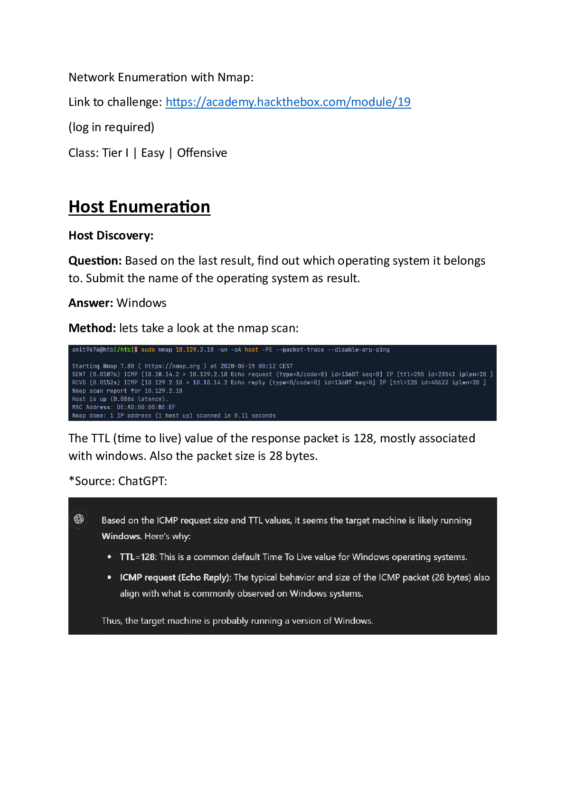
Question: Based on the last result, find out which operating system it belongs to. Submit the name of the operating system as result.
Answer: Windows
Method: lets take a look at the nmap scan:
The TTL (time to live) value of the response packet is 128, mostly associated with windows. Also the packet size is 28 bytes.
*Source: ChatGPT:
Host and Port Scanning:
Question: Find all TCP ports on your target. Submit the total number of found TCP ports as the answer.
Answer: 7
Method: we will use the command:
nmap -p- | grep "open" | wc -l
(we count the amount of lines where the word ‘open’ is mentioned)
Question: Enumerate the hostname of your target and submit it as the answer. (case-sensitive)
Answer: NIX-NMAP-DEFAULT
Method: we will run the command:
nmap -sV -sC | grep host -i
Saving the Results:
Question: Perform a full TCP port scan on your target and create an HTML report. Submit the number of the highest port as the answer.
Answer: 31337
Method: lets run the scan:
sudo nmap -p- -oA target
where ‘-oA’ outputs the scan result to a file called ‘target’:
While we can determine the highest port already, lets get it to HTML report:
One of the output files from the scan is ‘target.xml’:
Lets get it to html document with the tool ‘xsltproc’:
xsltproc target.xml -o target.html
Now lets open the report on the browser. We will need the file’s full path:
realpath target.html
Now lets enter in the browser URL:
/home/htb-ac-1099135/target.html
Service Enumeration:
Question: Enumerate all ports and their services. One of the services contains the flag you have to submit as the answer.
Answer: HTB{pr0F7pDv3r510nb4nn3r}
nmap 10.129.86.139 -p- -sV -sC
where ‘-sV’ and ‘-sC’ performs extra investigation on the service, including among others: version detection, information obtaining and banner grabbing.
‘-p-‘ assures the scan is performed on all ports.:
The flag will appear on port 31337 ‘elite’ service scan.
File included
Network_Enumeration_with_Nmap.pdf.pdf
1.8 MB
Related ebooks